Nine AI agent workspaces compared: the AI does the work, but who manages it?
You hand a task to an AI and come back fifteen minutes later. It has finished, just not the task you meant.
It picked a file format you did not ask for, rewrote a section you wanted to keep, assumed last quarter’s numbers, and translated before the source copy was settled. Each choice looked reasonable on its own. None was checked against the whole picture: what the work is for, which constraints matter, and which pieces depend on each other.
That is the frustration behind this comparison, which began with Kimi Desktop. The model is rarely the bottleneck; the agent makes too many default decisions before it understands the whole task. Bugs happen and get fixed. A workspace that fills every gap with a guess, and leaves you to find out which guesses were wrong, costs more than any single bug.
Work performed by an AI is not the same as work taken off your hands. If you still have to catch every wrong assumption, repeat every rule, move the results, and resolve every collision, you have delegated only part of the job.
Its central question is: who coordinates the work once several agents are involved—and who is still responsible when the plan changes?
A harness is the system around the model that lets it work: files, browsers, tools, permissions, context, and task management. The cases below come from attributed user reports; suggested workflows are identified as examples. This remains Part 1, a desk comparison rather than a shared-task benchmark of nine products. Sources and screenshots were checked on October 24, 2026.
Start with what the coordinator must own, or jump to the nine-workspace comparison. For individual capabilities, use the reference tables.
A workflow someone praised: doing it again without explaining again
On March 15, 2026, Reddit user rebelytics described their non-coding Cowork workflows. One task was concrete: prepare hundreds of advertising banners for import into the affiliate platform AWIN.
Their reported sequence was read the images → generate the required metadata → produce an import CSV → save the method as a Skill. On subsequent batches, they could reuse the workflow without explaining it again. They said hours became minutes; this is their account, not an independently timed result from this article. Original report
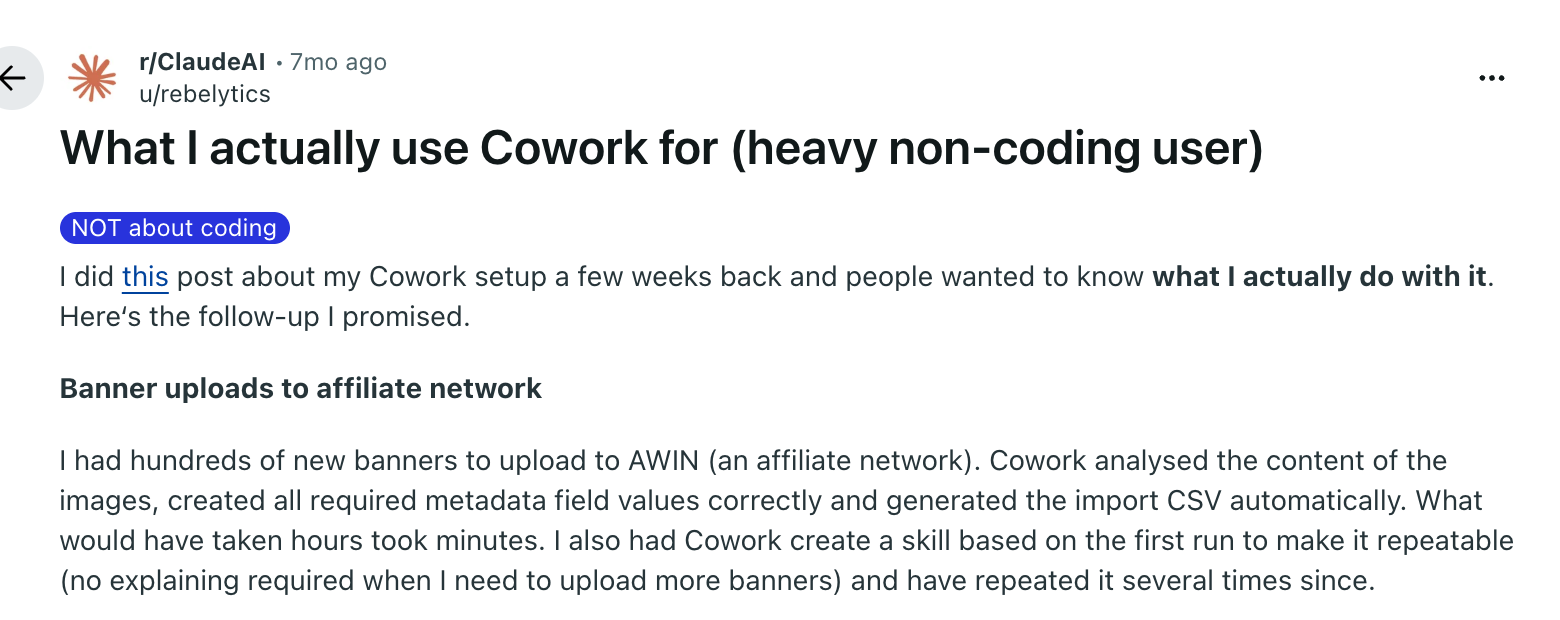
rebelytics on Reddit, March 15, 2026. Click to enlarge.
The detail I care about is whether the second run needs the same explanation. A polished first output is exciting. Keeping the field definitions, exceptions, and validation steps for the next run is what starts to change daily work.
Here is a starter prompt inspired by that case, not the author’s original prompt:
Read my import template and identify the required fields. Prepare a CSV sample for ten images, listing uncertain fields separately for my review. After I confirm the rules, process the remaining images. Save the field conventions, checks, and exception handling as a reusable workflow.
The sample makes the interpretation inspectable; the saved workflow reduces the explanation needed next time. The same approach can help with product-data cleanup, recurring competitor reports, and repetitive document preparation.
Remembering the procedure is not the same as judgment
Still, I think people may be over-relying on SOPs. Many answers to “explaining everything again” come down to saving the procedure as a Skill or in memory and following it next time. That helps, but it should not be absolute: many decisions differ from case to case. A reliable person does remember how things are done. They also speak up when the procedure breaks, and they can adapt an earlier procedure to a similar new problem. That, I think, is the ideal. I don’t have a complete answer to this yet, but these practices are worth trying:
- State where a procedure applies. Note which templates, file types, or data sources a saved workflow covers, and which it does not. Check the fit before starting, and say so when it does not fit instead of forcing it.
- Keep the reason, not just the step. Add one line on why each rule exists. Knowing the purpose is what lets an agent decide whether a rule still applies to a new case, or how to adjust it.
- Report a deviation before acting on it. When the input differs from before (new fields, unusual values, results far from the sample), stop, describe the difference and a proposed handling, and wait for confirmation. Neither silently follow the old rule nor silently change it.
- Fold corrections back in. Each time you correct it, record the exception and its reason in the workflow, with a date. Periodically look for rules that are rarely used or often overridden.
- Name the precedent when borrowing. When an earlier workflow is used for a new problem, say which one, why it fits, and what is different, so you can check whether the analogy holds.
A good procedure reduces repeated explanation. Good judgment decides when not to follow it.
The coordinator is the heart of the workspace
Once one workflow works, you tend to hand over several. You become the person carrying decisions between chats: “the source changed,” “wait for the translation,” “that test used yesterday’s version.” The coordinator should take responsibility for that unfinished distance between your request and an accepted result.
Say I hand over “make this bilingual market report worth reading” and come back expecting something I can review. I should not have to remember which agent has the latest copy. The coordinator needs to preserve the goal, divide the work, follow dependencies, check the combined result, and bring back the decisions that still need me.
This is the role I would evaluate, not a claim that every product below already implements it. A useful architectural starting point is Anthropic’s orchestrator–workers pattern: a central agent dynamically divides work and combines the results. A persistent project coordinator also has to carry decisions and unfinished work across sessions. Architecture reference
1. Keep the brief alive after handing out tasks
Consider what such a brief actually contains: English and Chinese versions, attributed real cases, authentic screenshots, nine products, and sign-off by the report’s owner before it goes out. “Write a comparison” loses most of that brief.
A practical coordinator would keep a short, durable project record: the accepted goal, current source version, task owners, dependencies, evidence, unresolved decisions, and release conditions. This can be a shared document or a product’s task system; a long transcript alone makes corrections hard to find. Each worker receives the relevant context and constraints, rather than an assumption that it remembers another chat.
Here is a suggested division for a report like this, not a record of a measured multi-agent run:
| Work | Boundary and dependency | Evidence returned |
|---|---|---|
| Research | Verify sources and screenshot provenance; no unsupported product claims | Source links, dates, versions, qualifications |
| Editing | Restructure the argument using that evidence | Revised primary-language copy and open questions |
| Translation | Follow the accepted copy; flag meaning changes | Corresponding translation and any unresolved differences |
| Layout review | Inspect the combined version after relevant edits | Rendered draft, link results, phone layout findings |
For example, “translate the report” is an incomplete handoff. “Translate copy revision A into Chinese; preserve source qualifications and the sign-off rule; change only the Chinese version; flag unsupported wording; return the diff and unresolved terms” gives the worker something it can finish and the coordinator something it can check. Revision A is an illustrative baseline.
2. When the user changes the brief, update the dependency chain
Now suppose I interrupt halfway: “Pricing is the heart of this report. Go deeper.” It changes the argument, not just one paragraph. Forwarding the same message to every worker leaves each one guessing how to apply it.
The following is the behavior I would want; it is a proposed workflow, not a claim that these steps ran automatically:
| Event | Coordinator’s next action | Work that becomes stale |
|---|---|---|
| The central argument changes | Update the brief; route restructuring to the editor | Translation of superseded paragraphs |
| Revised copy is accepted | Give the translator the new baseline and changed scope | Earlier bilingual consistency check |
| Both versions are ready | Review their combined page output | Layout checks affected by changed content |
| Checks pass | Prepare one version for the owner’s review | Nothing becomes owner-approved automatically |
Researching an unrelated source can continue. Translation of a replaced section should wait. A link-only correction need not invalidate every screenshot; a new comparison table does need another phone-layout check. Good coordination identifies which previous results are still valid. Otherwise parallel work merely produces more versions for the human to reconcile.
The same problem appears in a weekly competitor report: if the reporting period changes after charts are produced, the coordinator must update the data selection and dependent charts, not deliver a new summary wrapped around old numbers.
3. A worker saying “done” does not finish the project
There is a public report that captures this failure precisely. On August 26, 2026, liuyang0508 reported that Codex CLI 0.149.1 ended its main turn before collecting required results from three subagents. The results appeared after the next user message, about 32 minutes later. This concerns one long-running session, without a minimal reproduction; it is an open report as checked on October 24, not proof of a universal or current defect. Issue #40932
Codex’s subagent guide describes waiting for requested results before a consolidated response. The distinction matters: the documented mechanism and its successful execution are separate things to test. Subagent guide
For a report like this, a clean export establishes only that the document renders. It does not establish that a quotation is accurate, the translation preserves a qualification, or the owner approved the content. The coordinator should inspect the actual files, source references, differences, and relevant checks against the version being delivered. A fluent worker summary is a pointer to that evidence, not a substitute for it.
“Complete” also needs a scope. A research task can be accepted while translation is running. The report can be ready for review while sending it remains blocked on the owner’s decision. Required work must be collected and checked, or explicitly left unresolved; it should not disappear from the final report because one conversation has ended.
4. Handle waiting and recovery without making the user the dispatcher
A useful task record distinguishes ready, running, blocked, awaiting review, accepted, and cancelled. These are suggested states, not a standardized feature list. They answer different questions: a permission request needs a person; a dependent task needs its prerequisite; a quiet worker may still be running. Silence alone does not establish failure.
If a task stalls, first inspect its last observable state. Explain the blocker, preserve completed work, and resume from the relevant point. If the outcome of an external action is unknown, check whether it happened before retrying it: sending a second message is not recovery from an unanswered first attempt. Bound retries and escalate with a concrete decision when the agent cannot resolve the problem.
What I would want to receive is a compact report like this illustrative example, with real links and verification records in an actual delivery:
Both language versions are ready for review. The combined draft passes the link and layout checks; sending is pending your content approval. One source supports a historical version only, and the report says so. Review the draft and decide whether to approve it.
That is more useful than a transcript of every tool call. It tells me what exists, what was checked, what remains uncertain, and what I need to decide. The harness still has to expose results, approvals, and recoverable state. A coordinator cannot reason its way around a missing permission dialog or an output that never reaches the interface.
5. Ask what “project” actually coordinates
Product names can hide three different promises:
| What a project provides | What it saves you | What still needs checking |
|---|---|---|
| Shared space: related sessions and files | Finding things and moving files | Who owns the division of work |
| Shared rules: instructions, sources, memory | Repeating context and constraints | Whether corrections reach active tasks |
| A coordination entry point: accepts work, delegates, tracks reports | Checking every session yourself | Dependencies, evidence, recovery, release decisions |
A dashboard can show workers without directing them. A router can send a message to the right agent without tracking its outcome. A schedule can start work without deciding whether yesterday’s output was accepted. Test these responsibilities separately.
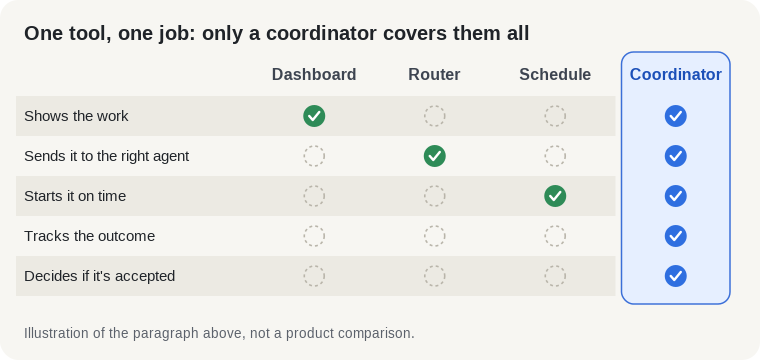
Claude Code Projects documents a coordinator conversation that starts worker threads and an Overview of questions, deliverables, and pull requests. It is a gradually released public beta. Cloud threads do not automatically inherit locally installed Skills, settings, and MCP connections. Projects documentation
Codex connects projects, chats, and worktrees, with durable rules in AGENTS.md or checked-in guidance. Delegation inside one conversation and ongoing responsibility across independent chats are different scopes; make the latter explicit. Projects and chats, subagents
Claude Code’s experimental agent teams document a shared task list with dependencies and agent messaging. That provides coordination mechanisms, with documented limitations; it does not establish that every workflow uses them correctly. Cursor offers an Agents Window, Antigravity organizes project conversations, and OpenCode and Goose provide local sessions and delegation. OpenClaw offers channel routing and agent workspaces. Look for what happens after dispatch, especially when a requirement changes. Agent teams, Cursor, Antigravity, OpenCode, Goose, OpenClaw
6. Use a coordinator where it removes more work than it creates
A one-paragraph edit rarely needs several agents. Stable, repeated steps may belong in a saved workflow. Coordination becomes valuable when work can split independently, findings change the plan, or the project continues across sessions. More workers cannot remove a dependency that requires the editor to settle the argument first.
There is also a cost to putting everything through one coordinator: unnecessary messages, duplicated research, and a queue waiting for its decisions. Let workers act within clear boundaries and return concise evidence. Keep the project record small enough to recover from it. If the coordinator loses the goal or carries stale state, every worker can be busy while the whole project moves in the wrong direction.
Anthropic’s architecture guidance recommends starting with the simplest workable approach and adding complexity when warranted. My practical test is similar: does the coordinator reduce the decisions I have to carry between people, tools, and sessions? Count the saved supervision against the additional cost and rework. Design trade-offs
Here is a starter instruction for trying that role; it does not add capabilities the product lacks:
Own this project through a reviewable delivery. Keep the goal, constraints, current version, task owners, dependencies, and acceptance evidence visible. Delegate only independent work with clear scope. When I change a requirement, update affected tasks and identify stale results. Collect and verify required outputs before closing; distinguish unresolved work from accepted work. Bring me concrete decisions and a combined result. For this article, retain
postsand stop at owner content review before publication.
Parallel work needs visibility, answers, and continuity
Visibility: which copy of the code is it changing?
On April 23, 2026, Cursor forum user davefowler criticized a changed worktree workflow: several tool calls before it was ready, repeated approvals, and difficulty distinguishing a worktree from the main checkout across windows. The post also praised the earlier experience and asked for direct creation and clear location indicators. Original feedback
A related report includes the interface itself. On March 30, Eugen_Konkov reported unclear worktree identification in 2.7.0 pre 92; an April 8 official reply acknowledged the visibility gap. The user’s original attachment is below. Screenshot and response
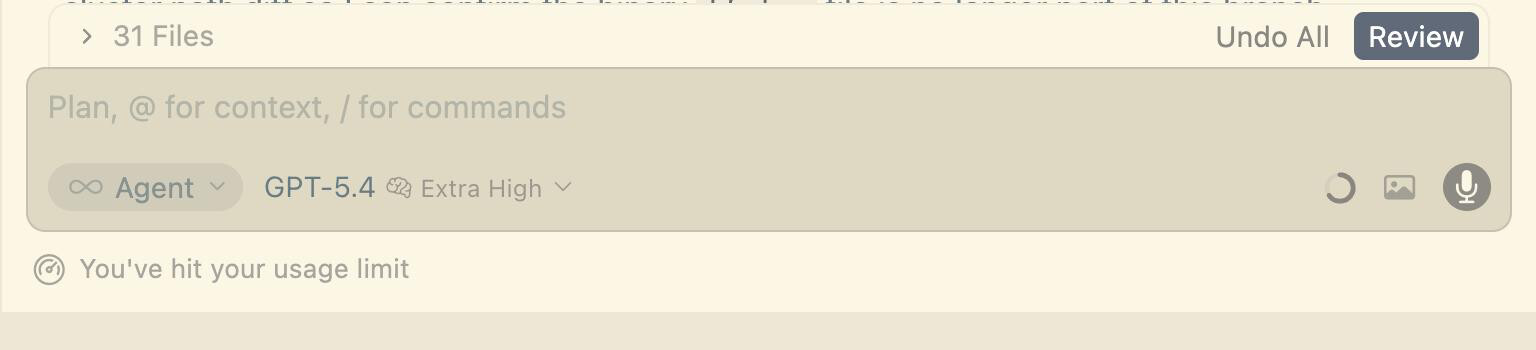
Eugen_Konkov's screenshot, Cursor 2.7.0 pre 92, March 30, 2026.
That is a historical user report, not a measurement of current Cursor performance. The selection question remains useful: once isolation exists, can you see where it is?
In my experience this is one of the most serious problems: several agents working in the same local folder, one checking out a branch here, another checking out a branch there, and everything ends in conflicts. The reason is simple: one folder has one working copy. When one task switches branches, the files under every other task change too, and those tasks do not know it. Running in a local folder is therefore not isolation; parallel code changes need a separate copy for each task.
A worktree gives tasks separate file copies. It cannot stop two tasks changing the same logic; it brings the conflict to merge time. Cursor’s documentation warns that subagents share the parent’s checkout by default and concurrent writes can overwrite changes. Ask for isolation when needed. Cursor subagents, Codex worktrees
For development work, make the handoff explicit:
State the working directory, branch, and allowed change scope for each task. Use separate checkouts for concurrent code changes; report overlapping scope. Deliver the diff, verification results, and proposed merge order.
Answers: does it tell you what it is waiting for?
Results also have to reach you. On September 17, 2026, a Kimi Desktop user reported that a task in Windows version 3.2.10 had finished and was visible from another client, while the local window kept spinning; restarting made the result appear. Another user reported similar symptoms in 3.2.14 on September 28, and an official reply said a fix would come in 3.2.15. These are historical reports about specific versions, not evidence that the current version still behaves this way. Report and official response Another historical example comes from Claude Code. On March 27, 2026, a Linux/VS Code user reported that version 2.1.85 did not surface an approval dialog when a background subagent tried to write outside its working directory. The equivalent foreground task did show it. The issue is now Closed as not planned, which should not be read as confirmation of a fix. This article did not reproduce it. Issue #39671
During a trial, deliberately stop a task at a point where it needs your answer. Can it explain which work is blocked, what it needs from you, and where it will resume? “Working” and “waiting on you” are very different states.
Continuity: why did someone think their projects had disappeared?
On July 8, 2026, publishing-business owner Riven_PNW described losing track of eleven business projects after the Cowork interface changed. The same post explains that the projects were not deleted: they had moved into the unified Projects interface. Some commenters said they had seen a migration notice, so lack of notification cannot be generalized to everyone. Original report
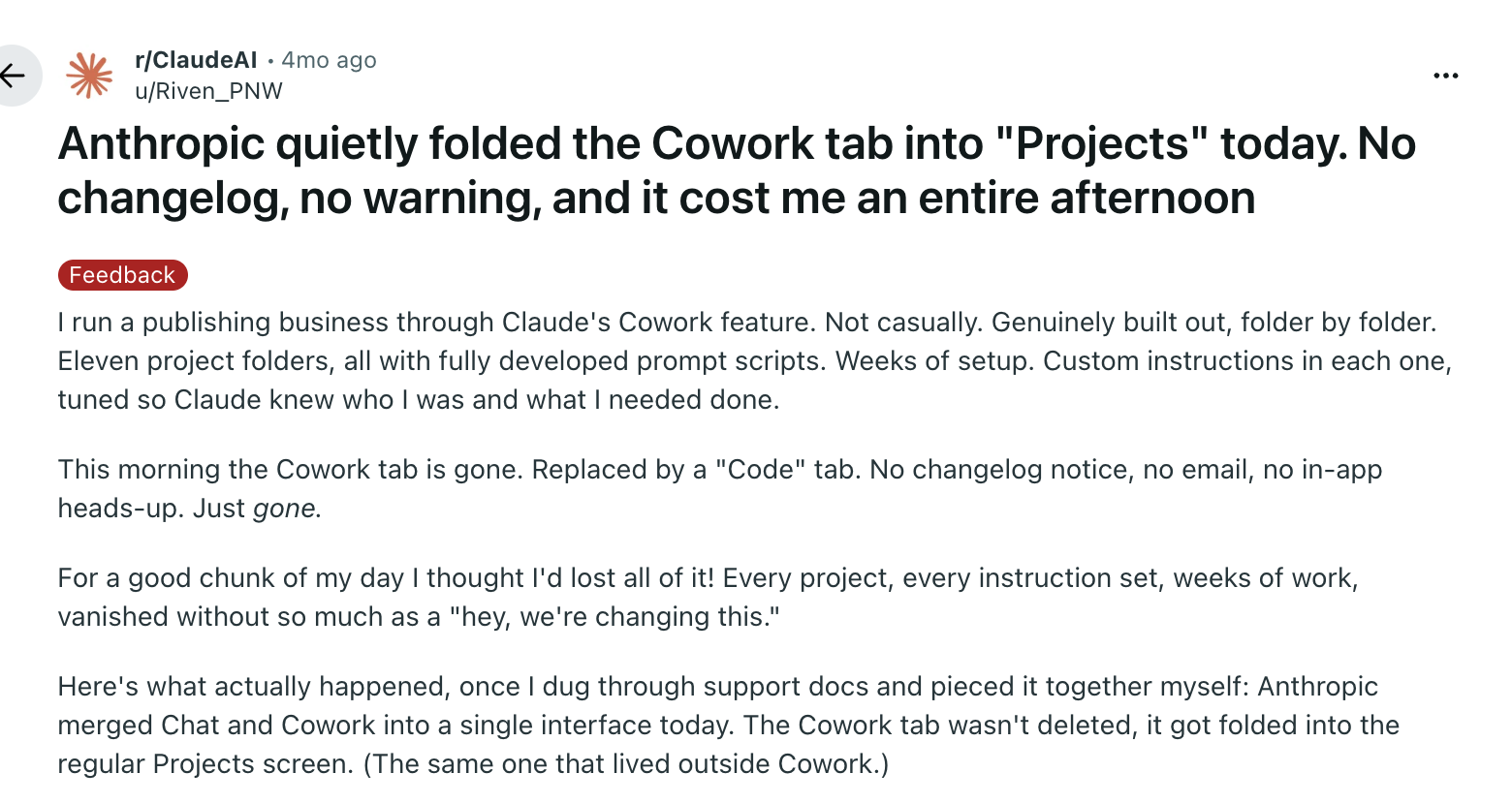
Riven_PNW on Reddit, July 8, 2026, including the clarification that the projects had moved.
Once someone builds business workflows into a tool, project navigation, transcripts, output locations, and recovery paths become part of the work. Close and reopen a task during your trial. Can you find the file, the last decision, and the next step? Inspectable logic means sources, tool actions, file differences, checks, and explanations of key decisions; you do not need access to a model’s private internal reasoning to review its work.
These are real needs, but how should a product meet them? I don’t think adding more entry points to the software solves the problem. Every new entry is one more place the user has to remember. A better direction may be this: when you come back, the product tells you where things stand. It shows the goal, what changed while you were away, where the latest result is, what is waiting on you, and what comes next. The files, history, and earlier decisions are linked from that summary instead of sitting behind separate menus. Recovery then needs a single “continue” that picks up from the last state, rather than another full explanation.
Use those questions to shortlist nine workspaces
Start with the work you need to do and the configuration and coordination you will accept. These are trial directions and trade-offs, not reliability rankings.
| Product | Work to consider first | What makes it useful | What to check in a trial |
|---|---|---|---|
| Kimi Desktop | Local material, reports, spreadsheets, presentations | Office outputs, browser, plugins, Dashboard | Task status, output preview, recovery |
| Claude | Documents and completed office tasks | Project context, office outputs, connectors | Local/cloud boundaries and finding old work |
| Codex | Mixed code and content projects | Chats, diffs, worktrees, automation | Who coordinates chats and how changes are reviewed |
| Claude Code | Engineering workflows and ongoing development | CLI/desktop customization; Projects coordination | Account rollout and local/cloud configuration differences |
| Cursor | Development where you often take over | Editor, Agents Window, diff review | Locations, isolation, and approval flow |
| Antigravity | Development across projects and conversations | Project settings, parallel work, browser capability | Differences across app, IDE, and CLI |
| OpenCode | Development with your choice of models | Configurable models, guidance, and tools | Additional browser, scheduling, and delivery setup |
| Goose | Your own general-purpose local workflows | Models, extensions, reusable Recipes | Maintenance, recovery, and repeatability |
| OpenClaw | Messaging, monitoring, persistent tasks | Gateway routing, agent workspaces, scheduling | Host maintenance and tasks needing desktop access |
Browsers and schedules deserve particular care. Your signed-in browser, a separate browser, and a cloud browser reach different material. Local and cloud scheduling also have different requirements. Kimi Work’s FAQ says desktop schedules need the host and client running and do not catch up missed triggers; tasks created on the web run in the cloud. Claude, Claude Code, and Cursor have their own cloud scheduling options. Kimi FAQ, Claude, Claude Code, Cursor
Check regional and account availability before migrating a workflow. Bringing your own model key does not settle everything either: connecting a model and having it reliably use the tools are separate checks.
A useful trial follows your task all the way through
Give two alternatives the task that frustrated you most. Continue beyond the opening answer, through correction, handoff, recovery, and delivery.
| Action during the trial | What you want to learn |
|---|---|
| Provide files and ask for an inventory or report | Can you check omissions and find sources and outputs? |
| Approve a sample, then add another similar batch | Are the rules reused? How much explanation is repeated? |
| Assign dependent tasks, then change the brief | Who updates the tasks and identifies stale outputs? |
| Change a requirement or interrupt and resume | Does the right session receive it? Are completed actions repeated? |
| Ask for the combined result while a worker is still running | Does it collect required results or explicitly explain what remains unresolved? |
Record four numbers: deliverables completed, human interventions, minutes of rework, and actual spending. We have not completed this shared-task benchmark; the cases here cannot stand in for scores across nine products.
Beyond subscription and API bills, count the time spent on setup, supervision, and rework. I want a workspace that makes it easy to tell what is finished, what needs me, and what I can leave in its hands.
The coordinator earns its place when you can review one coherent result, rather than assemble the project from several conversations.
Reference: capabilities and project mechanics
Use the expandable tables when checking your own requirements. “Yes” means an official capability or integration exists, possibly with setup, approval, or plan requirements. “Unconfirmed” does not mean absent. Parallel conversations, subagents, and routing are different forms of parallelism.
Expand: capabilities across nine products
| Product | File operations1 | Browser operation | Parallel work2 | Scheduled tasks | Reusable workflows |
|---|---|---|---|---|---|
| Kimi Desktop | Yes | Official browser extension | Agent Swarm | Yes, local | Skills, plugins |
| Claude | On desktop | Chrome integration | Subagent coordination | Yes, in the cloud | Skills, connectors |
| Codex | Yes | Yes | Yes | Yes | Skills, plugins, MCP |
| Claude Code | Yes | Chrome integration | Yes | Desktop and cloud | Skills, MCP, Hooks |
| Cursor | Yes | Built-in browser | Yes | Cloud Automations | Rules, Skills, MCP |
| Antigravity | Yes | Varies by interface | Yes | Yes | Skills, Rules, and more |
| OpenCode | Yes | Extension / MCP | Yes | Native persistent scheduling unconfirmed | Skills, custom tools |
| Goose | Yes | Enable official extension | Yes | Recipe scheduling | Recipes, Skills, MCP |
| OpenClaw | Yes | Requires setup | Yes | Cron, Hooks, and more | Skills, plugins |
Expand: project guidance, execution, and coordination
| Product | Project and durable guidance | Execution and isolation | Coordination and communication |
|---|---|---|---|
| Kimi Desktop | Optional local folder; Work project instructions unconfirmed3 | Local folder | You across tasks; Swarm delegates and reports within a task |
| Claude | Folder, linked chat project, or URL; instructions and memory | Local file access and cloud sessions depend on the interface | Related tasks in a project do not alone establish a coordinator |
| Codex | Local projects and cloud environments; AGENTS.md, shared app guidance and sources |
Local, Worktree, Cloud; Handoff between local and worktree | Delegation and subagent inspection within a chat; make cross-chat responsibility explicit |
| Claude Code | Local CLAUDE.md; Projects adds guidance, material, and memory |
Local folder/worktree; Projects usually runs cloud threads, with local execution on request | Projects coordinator; experimental agent teams offer messages and shared tasks |
| Cursor | Workspace, Rules, repository guidance | Local, worktree, cloud VM, SSH; subagents share checkout by default | Agents Window organizes sessions; subagents return results within a task |
| Antigravity | Multiple folders, project settings and permissions, Rules & Workflows | Local or new worktree per conversation | You manage project conversations, which can delegate to subagents |
| OpenCode | Starting directory and AGENTS.md |
Local directory | A primary agent can start child sessions and receive completion notifications |
| Goose | Session directory, .goosehints, Recipes |
Local execution | Subagents/subrecipes return to the parent; session history is not shared by default |
| OpenClaw | Workspace and instruction files per agent | Gateway host | Channel routing, background subagents, configuration-governed cross-session messaging |
Delegation, communication, and dependencies need separate checks. Returning to a parent, messaging another session, and sharing a task list solve different problems. Claude Code’s experimental agent teams provide shared tasks and dependency mechanisms, with known resumption, coordination, and shutdown limitations. A team label does not establish correct ordering. A scheduled trigger also differs from continually deciding the next step: ongoing work needs goals, state, and stopping conditions. Agent teams, Codex long-running work
Mechanism sources: Claude projects, Claude Code Projects, Codex projects, Cursor, Antigravity, OpenCode, Goose, OpenClaw.
How to read the evidence: official documentation establishes capabilities; public posts illustrate individual experiences rather than failure rates. Starter prompts and division-of-work tables are suggestions. Images include crops captured from the original feedback pages and a user-uploaded product screenshot, with no rewritten text. Recheck prices, plans, regional access, and rollout status before a trial.
-
File access applies to the authorized execution environment, not necessarily your computer’s files. ↩︎
-
This records the presence of parallel conversations, subagents, or routing, not equivalent coordination quality. ↩︎
-
Chat projects and Desktop Work projects are different surfaces. Do not count chat’s instruction features as Work features without checking. See Kimi Work overview. ↩︎
 Email
 GitHub
 Instagram
 Coffee chat


Comments
Comments load here, powered by GitHub Discussions.